Role
Timeline
Tools
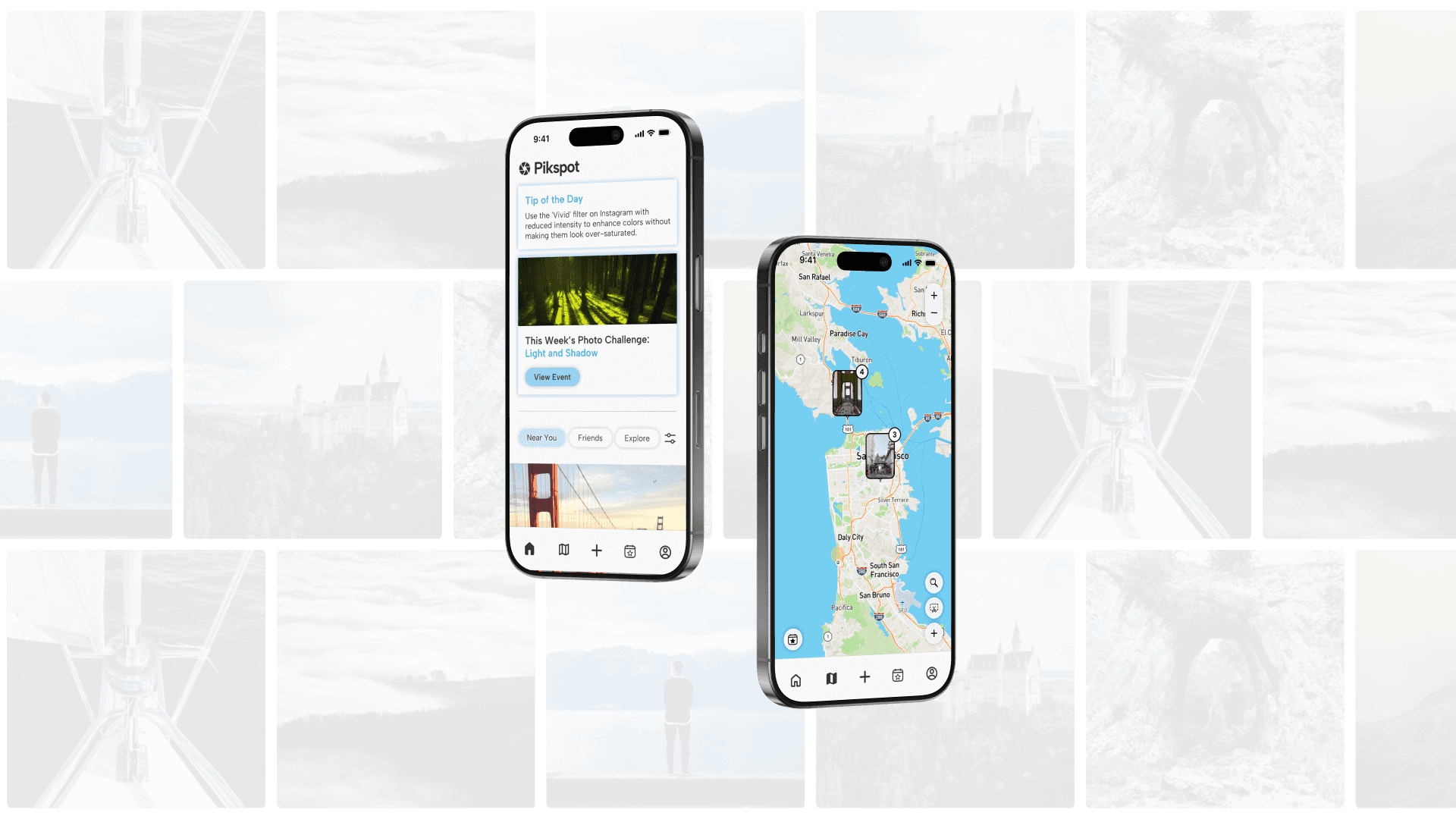
Overview
The Challenge
Finding hidden or niche locations to take photos can often be a challenging task for photographers. In Design Interactive’s Spring 2025 Cohort, our team was motivated by this problem to design Pikspot, an app for photographers to quickly find and share photography locations. Over the course of 6-week design sprint, we conducted in-depth user research, prototyping, and testing to create a location-based app that brings the photography community together.
Research
Understanding Our Target Audience
Our team utilized a mixed-methods research approach to understand how photographers currently discover photo locations. We also wanted to further understand the behavior behind sharing photos and locations with other people, as well as the social and artistic decisions that are made during the photography process.
Surveying User Behavior
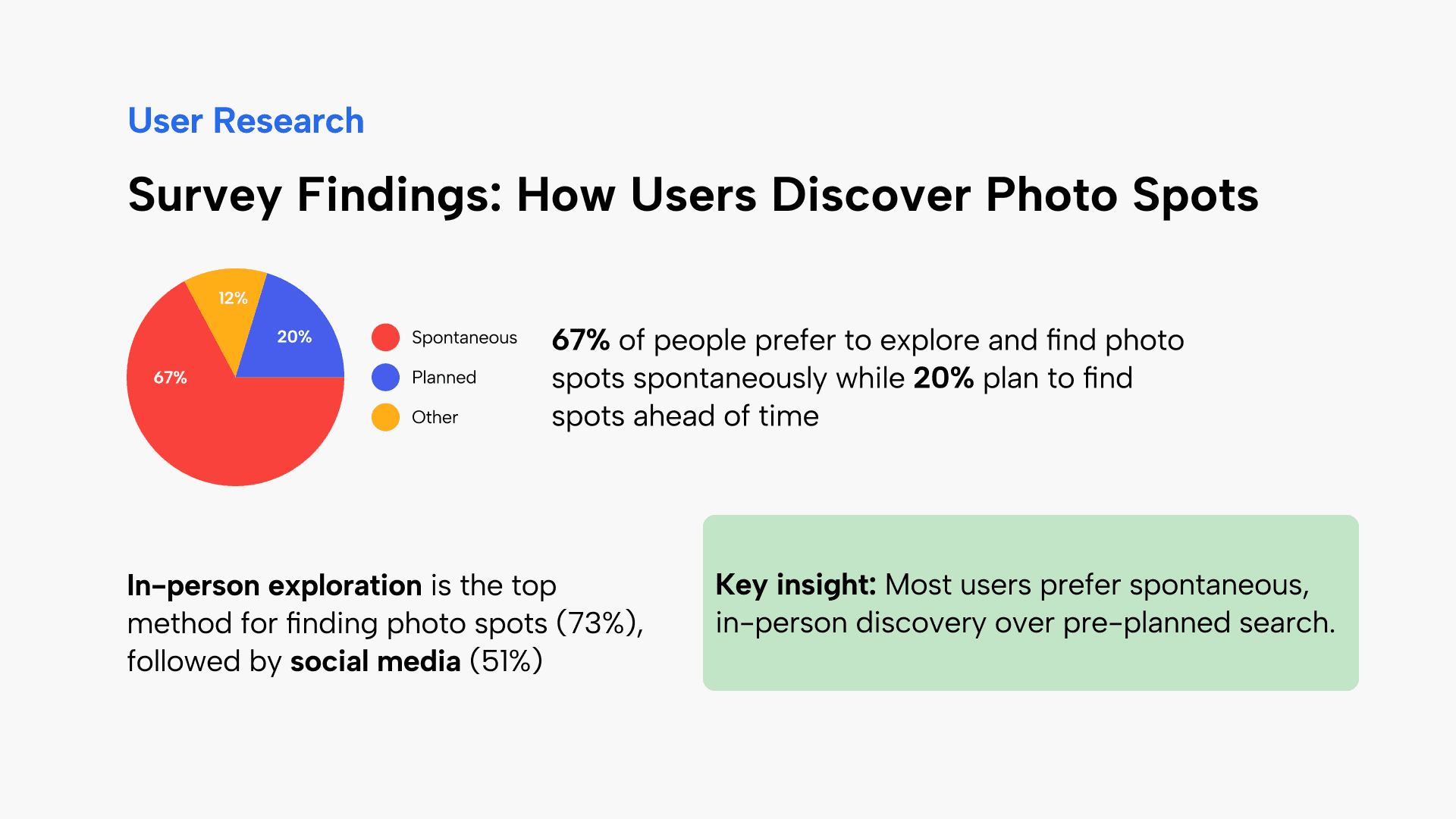
With these queries in mind, we began by conducting user surveys. Our target audience was young adults with any interest in photography, regardless of skill or commitment. From our 49 respondents, we discovered that:
67% prefer to explore and find photo spots spontaneously
20% like to plan their photo spots
73% explore locations in-person
51% use social media to find photo spots
Interview Insights
To gain a deeper understanding our users, we also conducted interviews with 5 UC Davis undergraduates with a greater involvement in photography. These interviews revealed two key insights:
Spontaneity: Interviewees appreciate spontaneity as an integral part of their artistic process, often even being part of the fun of taking photos. One user says that “photographers need to be adaptable,” while other users often go into photo shoots without a specific location in mind.
Gatekeeping: We received a variety of opinions related to the disclosure of photography locations; some users wish to share the pinpoint locations of their photos, while others would not want share with anyone at all, citing that places can be ruined or lose their charm when too many people know about it. Identifying this spectrum of use cases was important to our team to design an app that was inclusive and comfortable for both sides to use.
Competitive Analysis
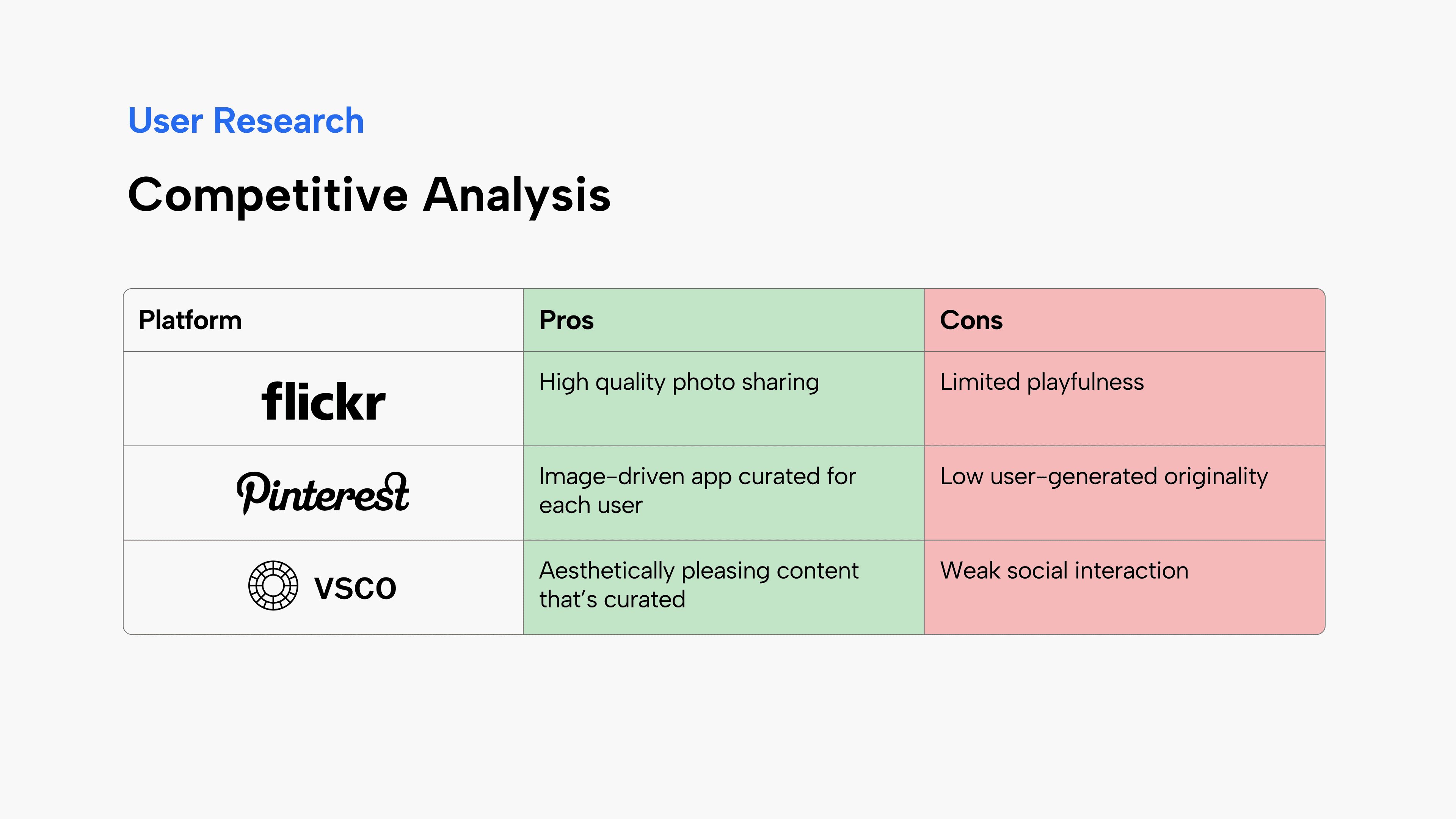
Finally, we reviewed existing photo-sharing platforms to compare their strengths and weaknesses and why users engage with them.
Ideation
Affinity Mapping
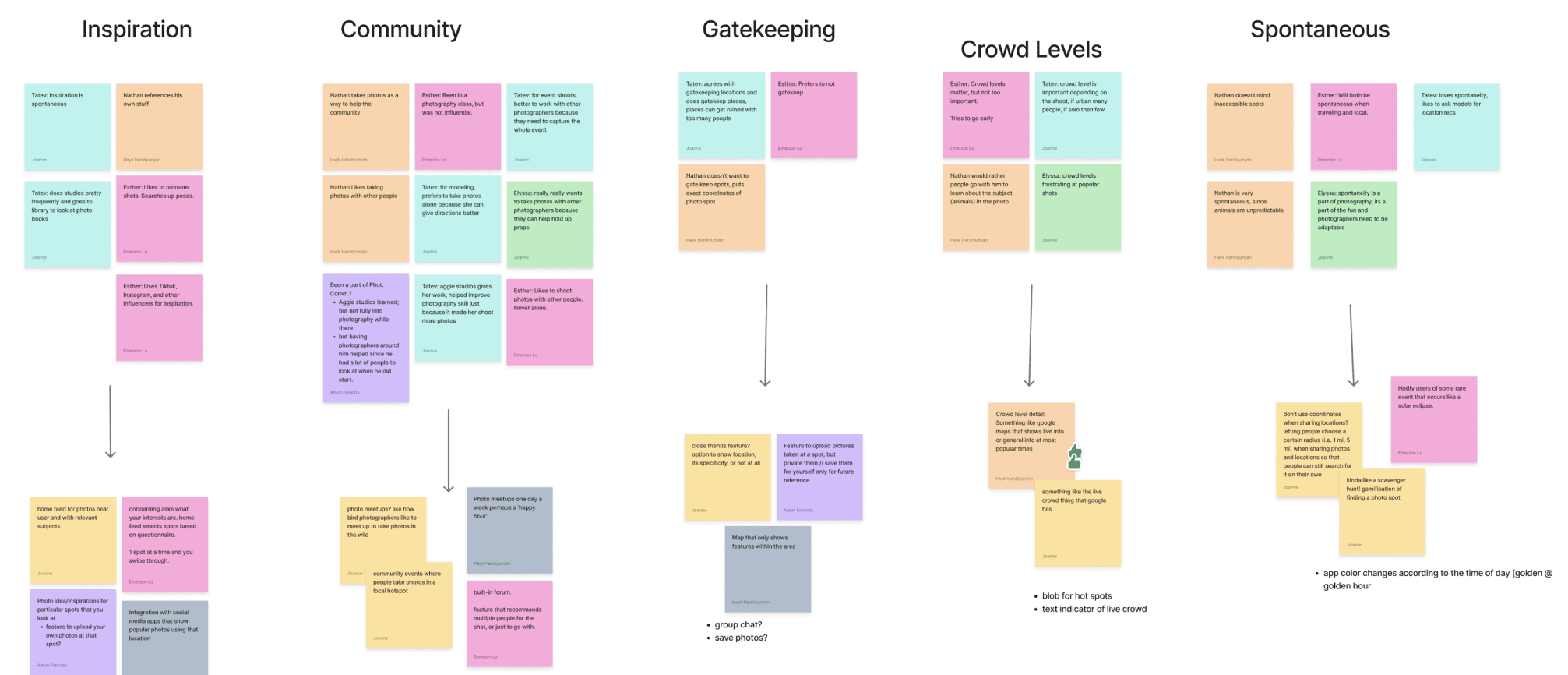
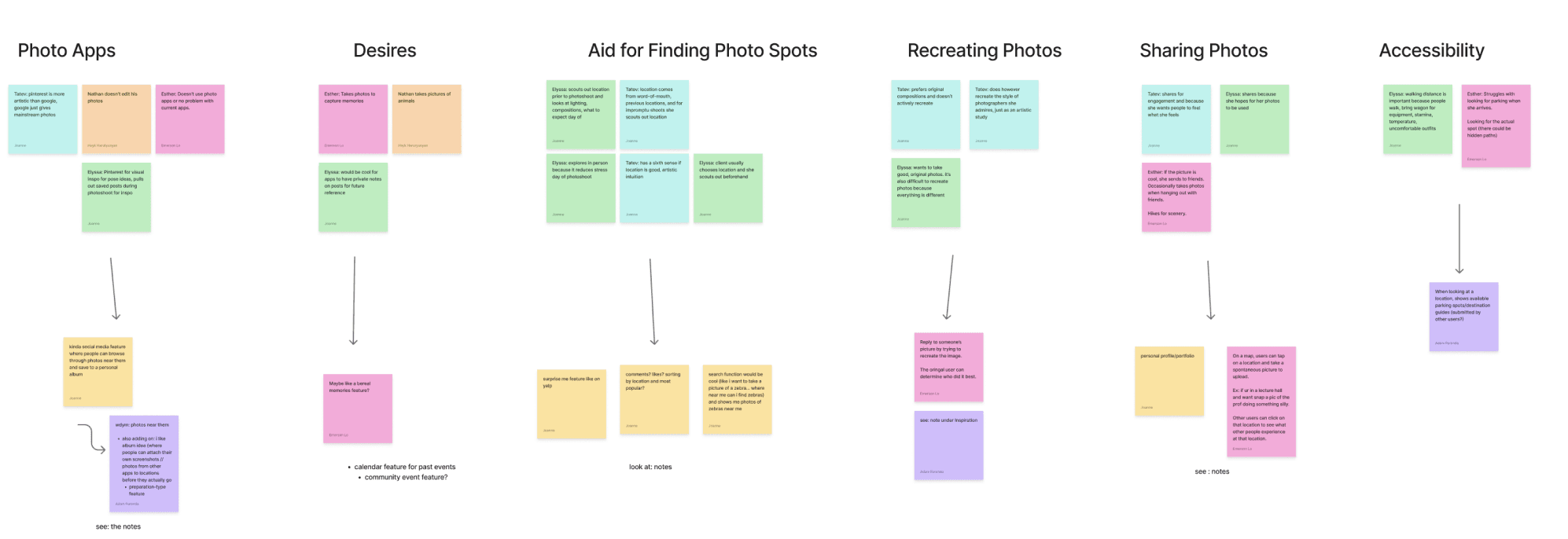
From our user interviews, we organized similar interview answers together and brainstormed ideas from the feedback we gained.
We found many answers regarding spontaneity, where many people stayed spontaneous when deciding to take pictures
Answers regarding spontaneity were also posed in other categories. For example, when answering about inspiration, people took inspiration from social media posts but did their own thing spontaneously with those photos in mind.
Revising Our Problem Statement
Through analyzing the answers from the survey and user interviews, we created a finalized revised problem statement:
“How might we design an app that complements spontaneity in photography, while also making it easier to discover and contribute to location-based photography in a natural and inviting way?”
Feature Matrix
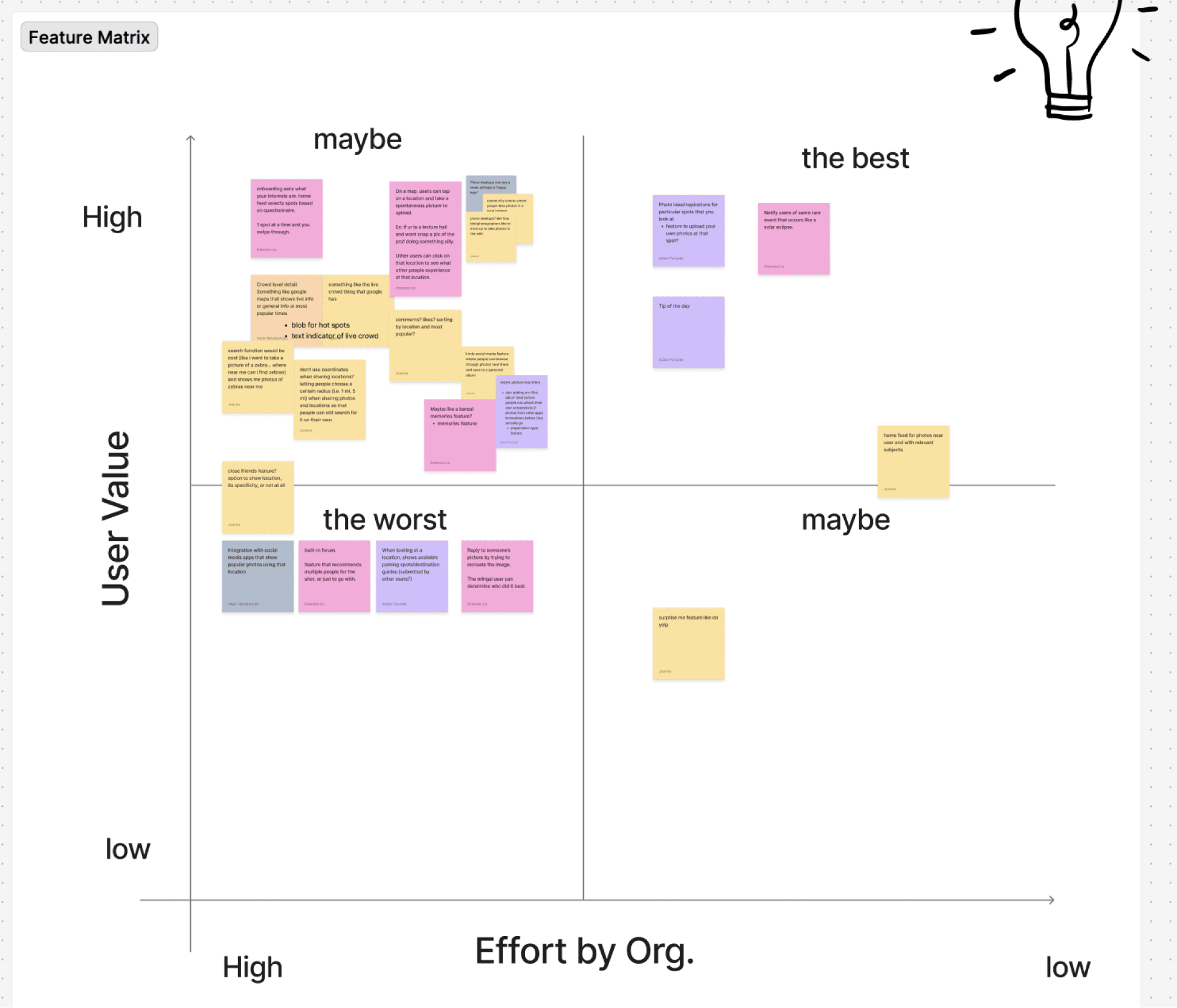
We then placed brainstormed ideas into a feature matrix that compared the effort needed to carry out the feature, both design- and feasibility-wise, and user value the feature holds. This allowed us to consider features such as:
Uploading photos to specific locations
Home feed to see photos uploaded near you
Live crowd level indicator
And avoid features such as:
Built-in forums
Integration with social media apps showing popular photos in a location
Lo-Fi Sketches
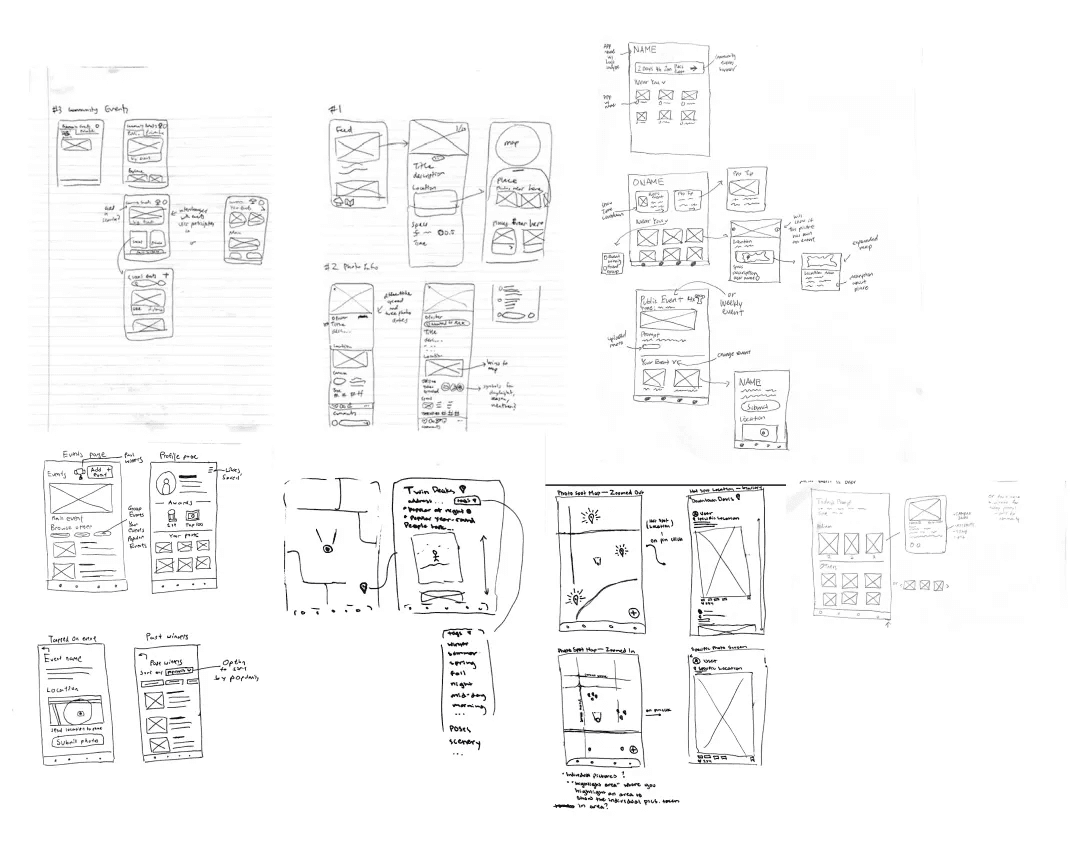
After completing our research, we created low-fidelity sketches for each page of the app, dividing the work among our team members to cover all the key screens we wanted in our app including the feed, events page, map and profile page.
This step helped us quickly visualize our ideas and explore layout options without getting caught up in the small details. It allowed us to rapidly brainstorm the overall structure before committing to a more polished digital prototype.
Usability Testing
Observing How Students Use Our Product
We conducted two rounds of usability testing, each with 5 UC Davis undergraduates as participants. Users were asked to complete the following tasks:
Navigate between the scroll and events pages
Upload a photo to an event
Select an area on the map to view its photos
Locate and edit top achievements on the profile
Findings
From our testing, we realized there was confusing navigation between the scroll and events pages, especially within the events page itself. Users could not tell the difference between the “Main Events” and “Saved Events” pages, and the navigation bar icon for the events page also misled users into thinking it was related to achievements. Uploading photos had a frustrating user flow, often asking them to repeat actions, and users could not intuitively complete the map task without having to click through each icon and see what function they purposed. When completing the task on the profile, users also attempted to edit their top achievements on multiple pages.
Actions
Based on our feedback and the user behaviors we observed, we needed to:
Improve visual clarity by making pages more distinct, icons more representative of their functions, and reduce clutter across the app
Adjust user flows for a more intuitive experience with less repetition
Reduce constraints for certain user tasks to be achievable across multiple pages
Final Designs
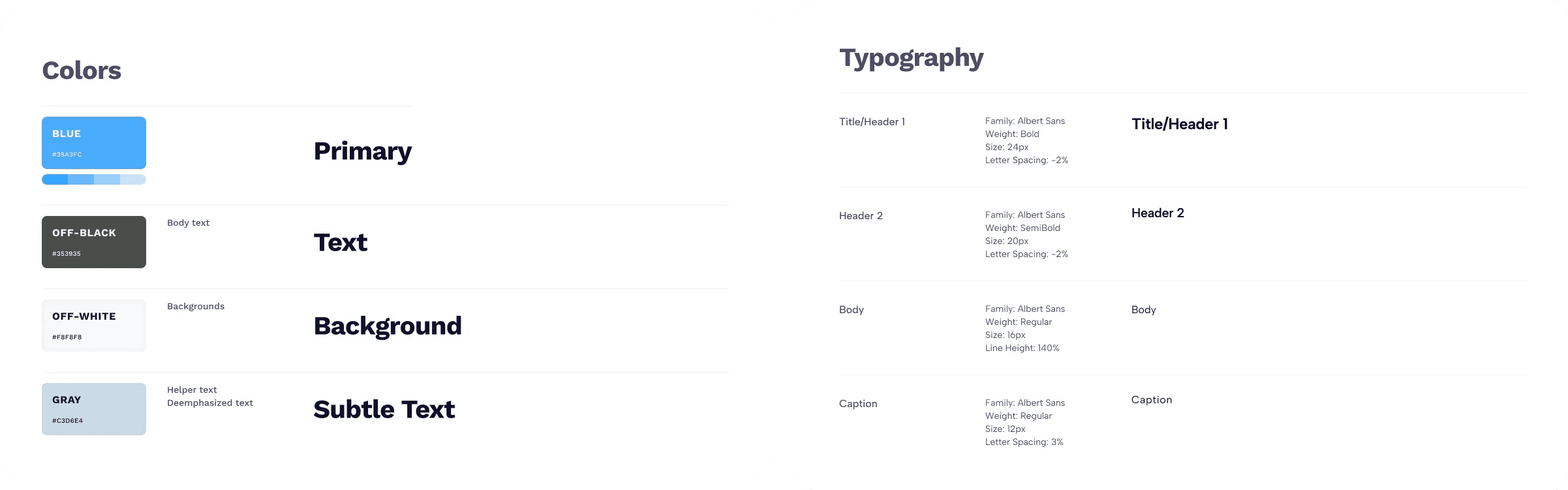
Design System
Onboarding Flow

During the onboarding process, the app requests the user’s location data so that the location-based features of the app, such as the map and nearby photos, are functional. Users can also customize their scroll feed experience by selecting their preferred photography subjects.
Home Feed for Community Inspiration

On the scroll page, users can read a “Tip of The Day” to learn helpful photography advice or discover hidden features from other popular apps. The weekly photo challenge is shown at the top of the page, giving users a quick and easy access to a main challenge they can participate in. We’ve also decided to highlight these sections with a blue glow. Below that, a scrollable gallery showcases photos taken by others nearby, by friends, or from around the world.
Community Event Challenges

On the community events page, events consist of a prompt and a time duration, and some are location-specific. Users can upload one submission per event. Submissions made by others remain anonymous until you submit a photo. The creator of the event can determine a winner at the end. There are both non-location-specific events, like the weekly photo challenge and global events, as well as location-specific ones, such as events near you or with friends. At the top right of the screen, users can access icons to create an event, view saved events, and check past events.
Map Discovery


We moved away from displaying individual pins all over the map and instead grouped sets of photos by area to reduce cognitive load. Each photo group opens into a scrollable gallery showcasing pictures taken in that region. As users zoom in, photos separate into more specific areas for easier browsing. If allowed by the uploader, users also have the ability to navigate to the exact location where a photo was taken. Additionally, a Community Events button is available directly on the map, letting users browse current events without needing to leave the page, with the option to jump straight to the event’s location on the map.
Takeaway
Presentation Day
On presentation day, our team delivered a ten-minute presentation to a panel of three judges: Mike Remington, Daniel Amara, and Charlie Stabb. We received valuable feedback from Mike in particular, who also happened to be a photographer. He complimented us on the visual design of our project while also giving us tips on how to enhance our presentation and its narrative.
Challenges
Our main challenges were with identifying user pain points and ideating on their possible solutions. We also struggled with narrowing down our ideas into the core features of our app and balancing visual clarify with functionality during our prototyping stage.
Next Steps
Our next steps are to create a desktop view for more user flexibility. We also want to expand on certain app features, such as a judging system for community events, more achievements with custom icons, and further testing and iteration of the map to ensure its clarity.
Previous Project:
Next Project: