Role
Timeline
Tools
Introduction
Overview
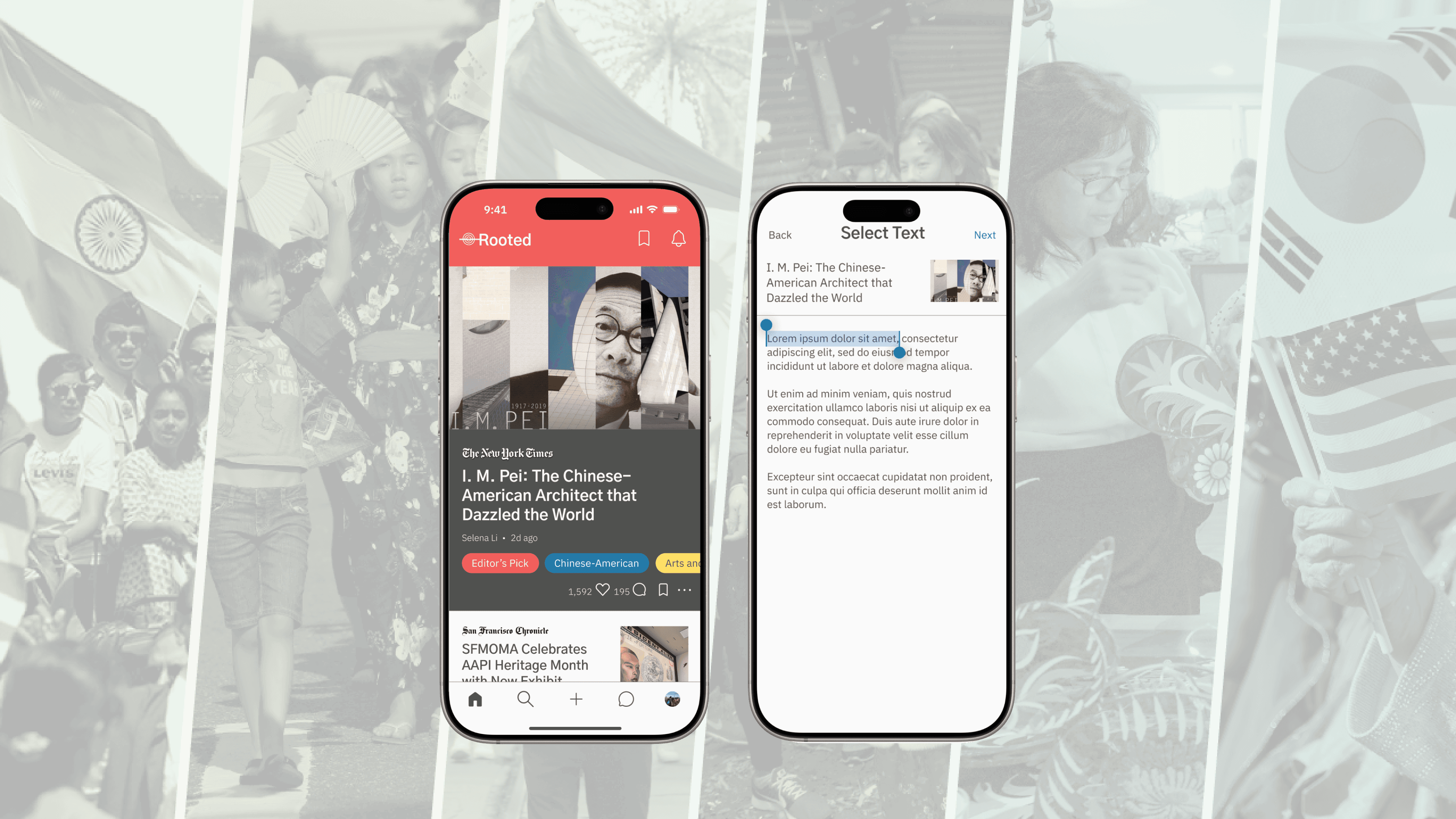
Rooted is a mobile application project for DES 112 (UI/UX Design: Principles and Practices) that tackles societal inequities, specifically addressing the lack of awareness around AAPI topics, like news, history, and representation. My project was motivated by my own lack of connection and understanding of the community I belong to, and my goal was to design an app that provides easy access to AAPI topics and people within the AAPI community.
How Might We…
How might we design an application that makes learning AAPI topics easy and accessible while strengthening connections in the AAPI community?
Solution
Rooted serves as a social media platform for any user to easily discover AAPI history and news. Users can view curated articles as well as interact with others through posts, comments, or a novel feature of annotations for specific textual engagement. Rooted aims to provide more opportunities for people to learn and exchange stories while building an online AAPI community.
Research
Understanding the AAPI Experience
To better address the challenges that AAPI people may face, my research focused on the AAPI experience and the perception of this group in the U.S. through initial literature reviews, followed by interviews with AAPI-identifying students.
My primary objectives were to gauge the general awareness of AAPI history, the potential barriers to further understanding, the issues AAPI people may face, and how connected they are with their own communities.
Literature Review
I began my research with literature reviews to obtain a wider observation of AAPI experiences. Most of this research drifted towards discrimination and particular stresses as a result of ethnicity, so I utilized these findings for my interview questions to visualize particular situations. I also discovered the inequities in healthcare that AAPI people face, so I modeled a persona in a potential health-related situation to understand how my app can help reduce this problem. As for AAPI history, only a minority consider themselves knowledgeable, and those who do cite social media as their major source of information.
User Interviews
Because each AAPI experience is unique, I conducted interviews with two AAPI-identifying students to understand their thoughts and backgrounds in more detail. Among the two, both of them have faced and/or know someone who has faced discrimination based on their ethnicity. One of them experiences cultural stressors as well, citing the pressure to succeed and the cultural disconnect as the sources. Both use social media and feel connected to the AAPI community as a result of their feed, with the one student also using it to relieve those stressors by hearing others talk about it. For AAPI history, neither consider themselves very knowledgeable about the topic and are unsatisfied with the education received regarding the topic, claiming it is a subject important for all Americans to study.
Ideation & Synthesis
User Personas
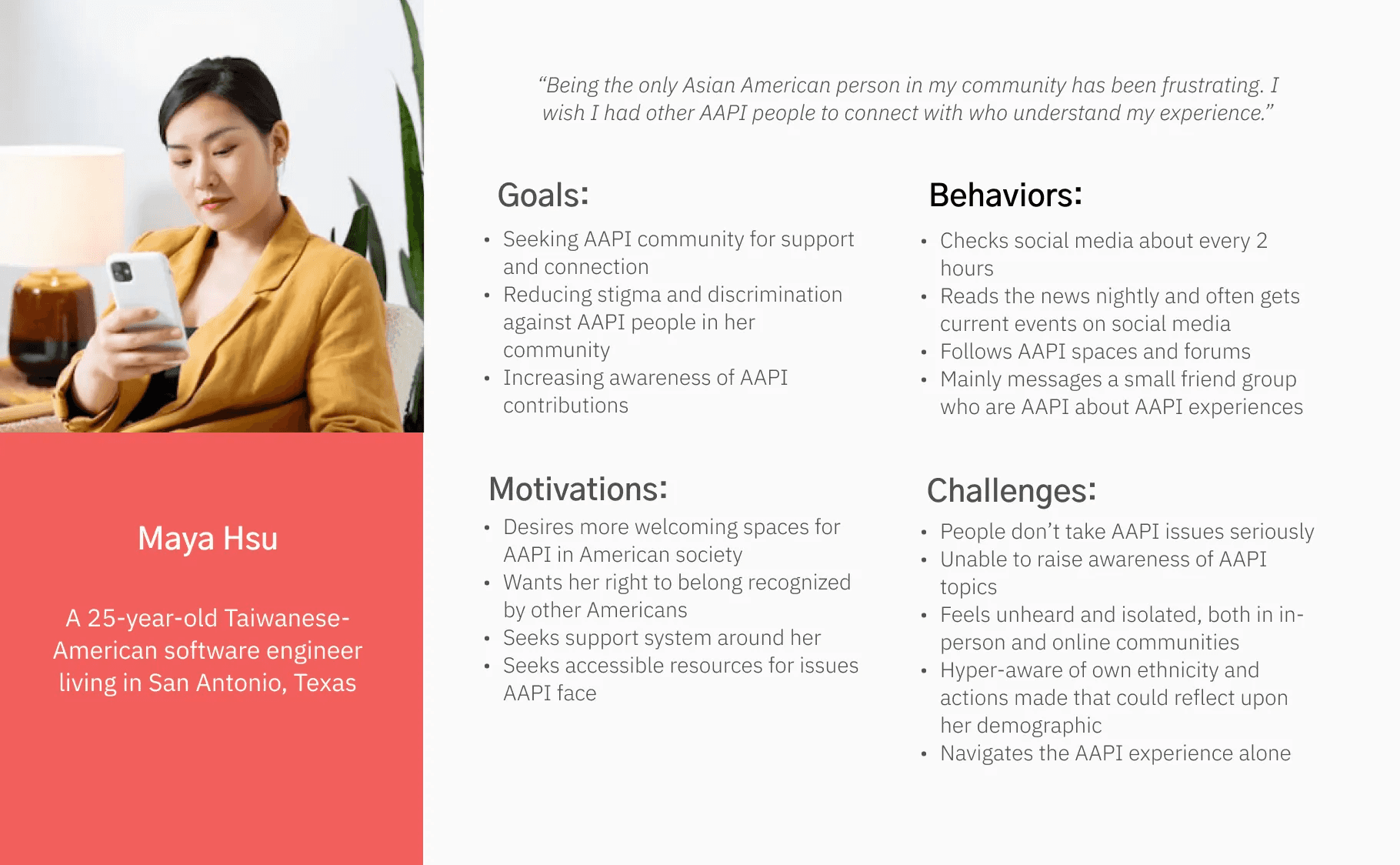
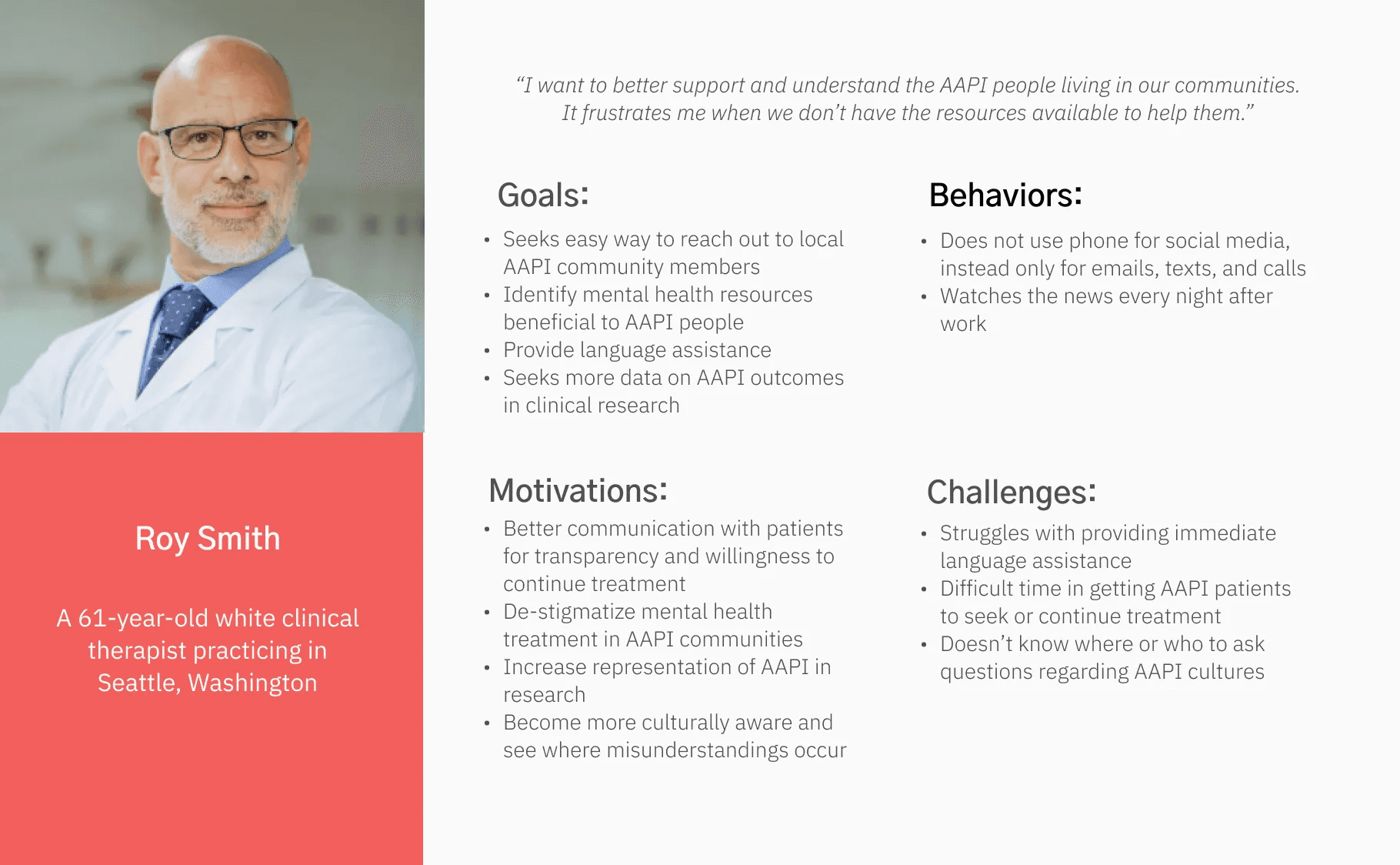
To better understand how people may use the app, I created two user personas, each with potentially differing use cases. For Maya, living in a location without any AAPI community is a major source of frustration for her and she struggles to find support for the unique issues she faces. For Roy, helping others is his responsibility but also his source of distress. He wishes to help his AAPI patients seek or continue treatment, but he faces obstacles like the language barrier, mental health stigmatization, and cultural conflicts.
These user personae guided me toward addressing the various other needs that users may face beyond learning AAPI history, and I kept them in mind as I began to realize how users would interact with my app.
Key Insights
With my findings, I could identify the main areas of focus in my app:
Informative Material: People already utilize social media to learn about AAPI topics, so making articles visible and accessible could promote more learning
Community-Based Content: Interacting with other users helps build personal connections to the AAPI community and can provide outreach, support, and answers to problems that users may face
Reader Accessibility: Since the app is designed to make information about AAPI topics quick and accessible, whether or not users can read the material should not be an obstacle to learning
Lo-Fi Sketches
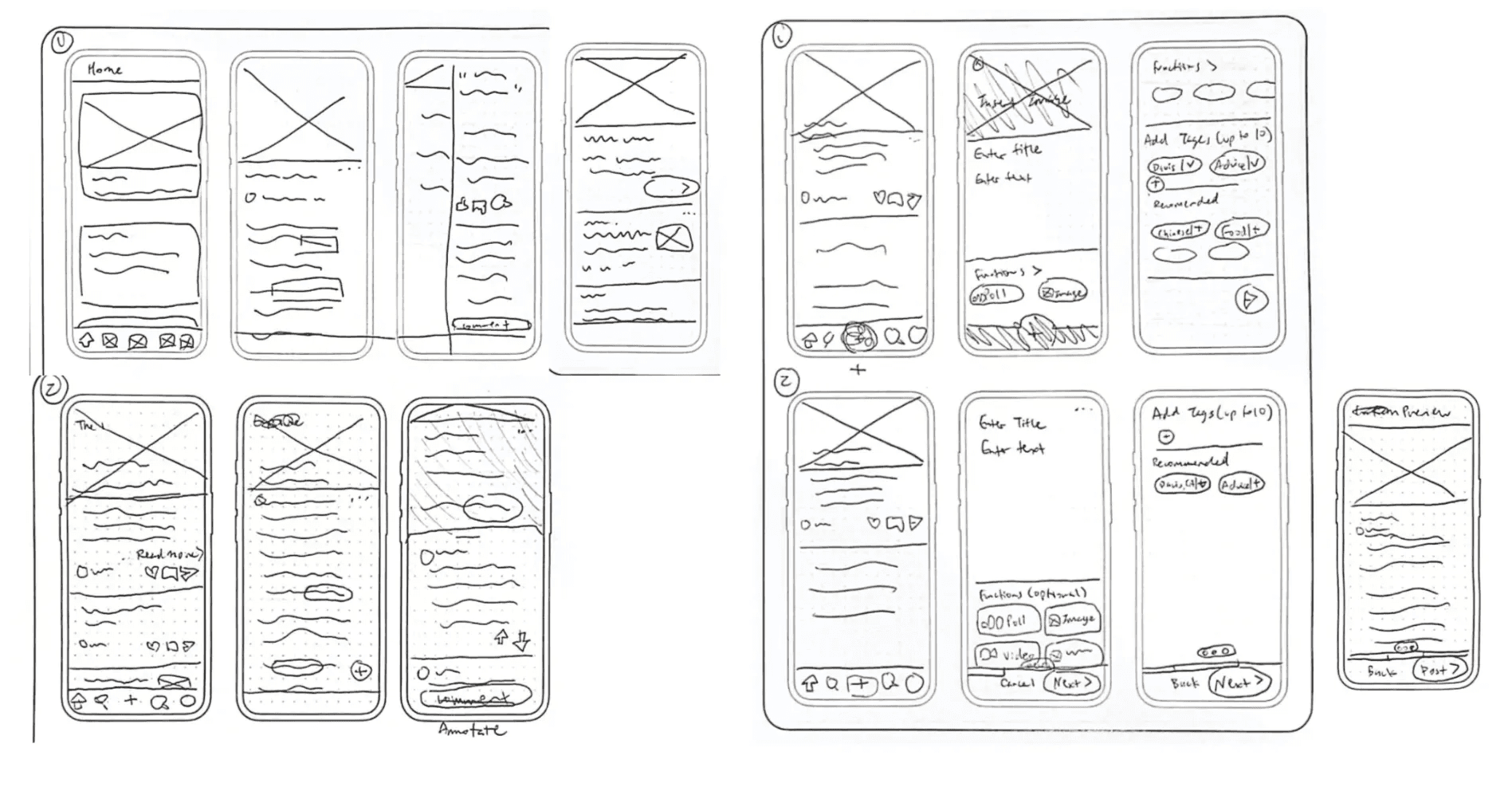
Using my findings and insights, I ideated several iterations of the homepage, annotation, and posting functions of my app. To make information quickly accessible, I opted to showcase a “featured” article on the homepage of the app, much like the headlines of other news apps. The home page and posting functions also highlight the community-based features of my app, and the eventual visual decluttering through my iterations would help make information easier to read and find.
User Flows
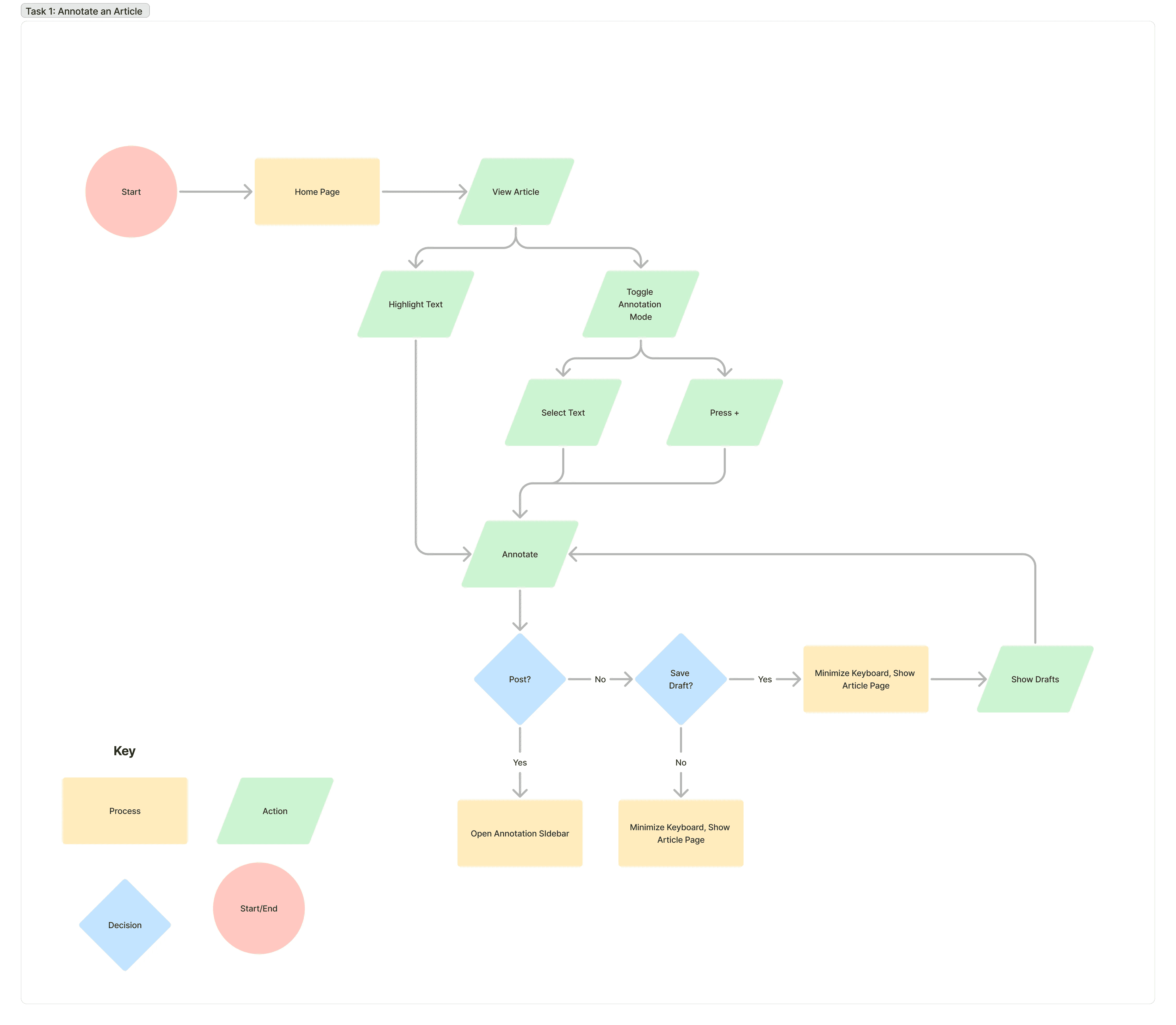
I developed user flows for two of my main tasks to better prepare screens for mid-fi and prototyping. For the task of annotating an article, I considered the possibility that users may be distracted by annotations and included a toggle for the feature. I also wanted to reduce constraints on users by making the feature accessible in multiple ways, not just through the toggle. Lastly, since both tasks involve user input, I included the option to save drafts to handle the possibility of resuming at a later point.
Mid-Fi Prototyping
Wireframes
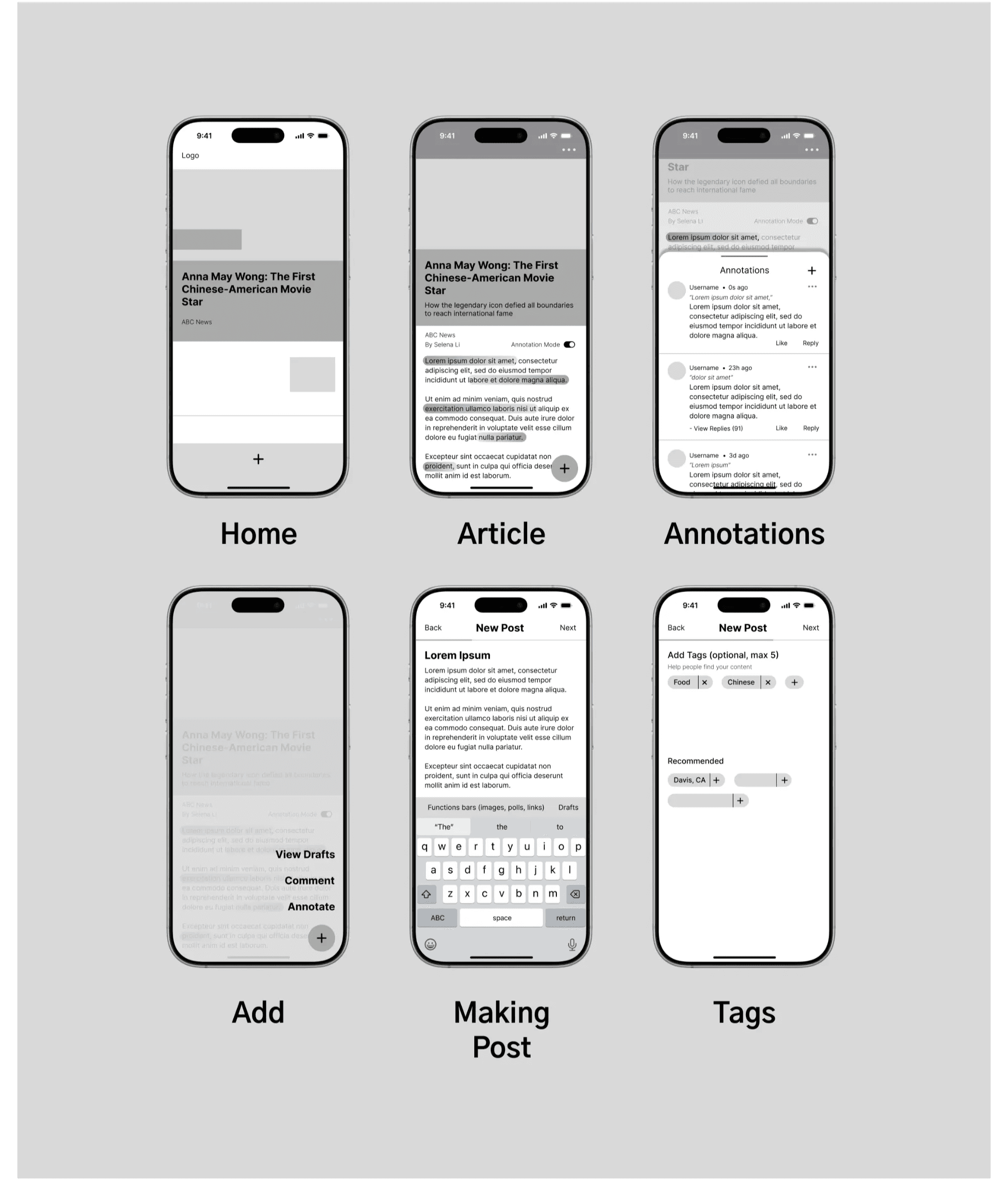
Through additional rounds of testing and iterations, I eventually transferred my lo-fi sketches from paper onto digital screens through Figma. During this stage, I established a brief, general layout of the app and prototyped several main functions. I also identified a few features to design further, like the options to save and like a post and potential error handling.
Usability Testing
In the usability testing phase, I conducted a total of two rounds of tests, each with 5 participants. All participants were UC Davis students, aged around 19-21, and had mixed experience with UI/UX. In the first round, users were asked to make an annotation on an article and to make a post, while in the second round, users were additionally asked to create an account.
Findings
Making an Annotation:
Users generally liked how annotations were toggleable
Users also liked the different avenues to making an annotation (via highlight instead of toggle)
I noticed some hesitation when users were choosing between “comment” and “annotate”
Hierarchy and clarity issues were present with buttons and text
Many users could not figure out how to view annotations, often needing to “play around” the buttons on-screen
Making a Post:
Some confusion noted with the tags feature and what the app meant by “recommended tags”
Users were uncertain how they might search for a tag
Dummy text confused and overwhelmed several users
Users enjoyed the feature to save drafts
Actions
To address these issues, I designed a brief walkthrough of the app after a user mentioned how they would prefer a tutorial rather than exploring on their own. It also served as a way to reduce confusion in navigating the annotations feature and clarified the actions the user could take. I then reordered the hierarchy of certain text buttons and made the annotation toggle bigger and more visible. The prototyping in the tags feature is now also empty at first, as opposed to already toggled, and additional error handling was implemented. The “lorem ipsum” dummy text throughout the process of making a post is currently replaced with an actual user post to make the function less confusing and more realistic.
Hi-Fi Prototyping
Design System
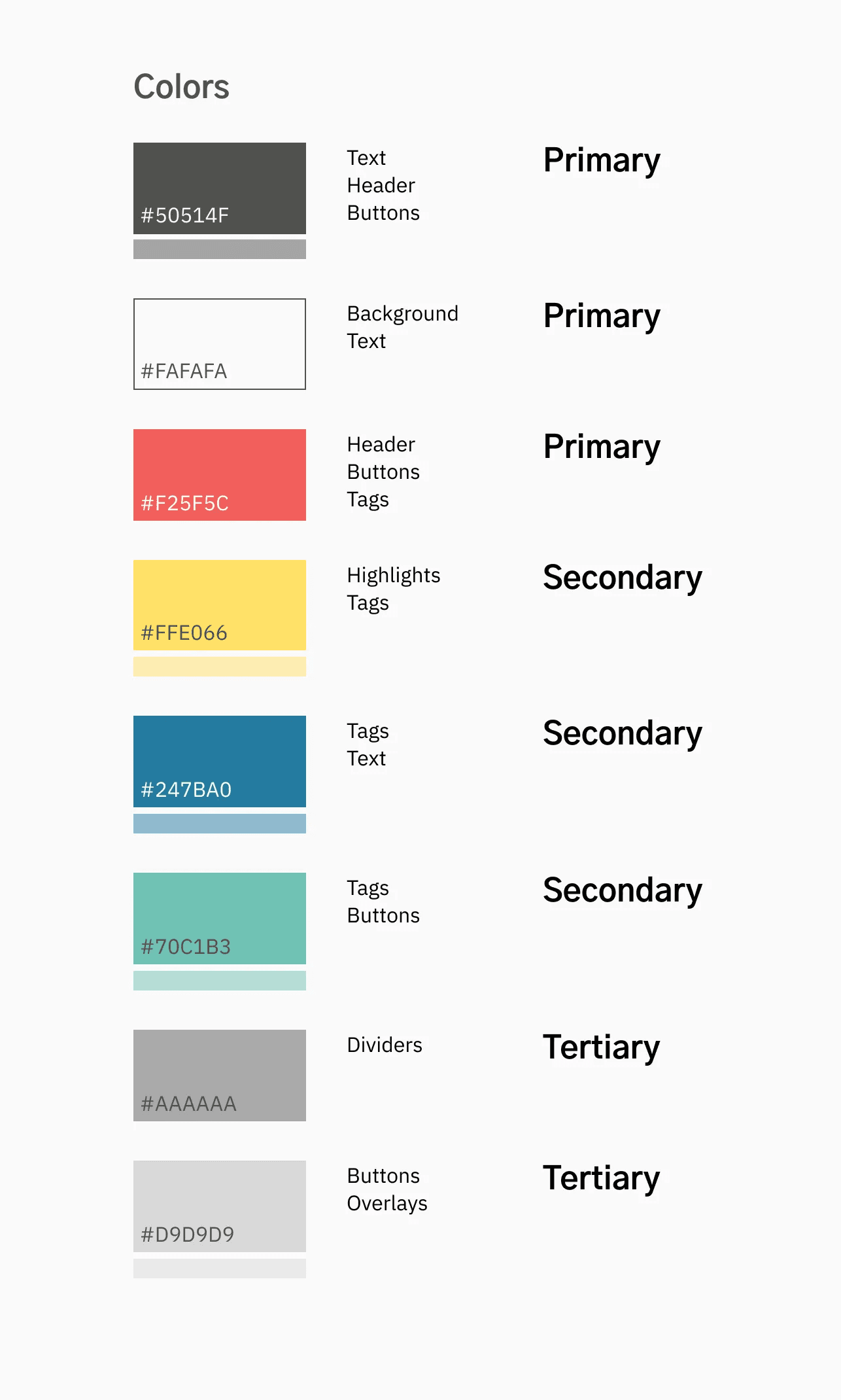
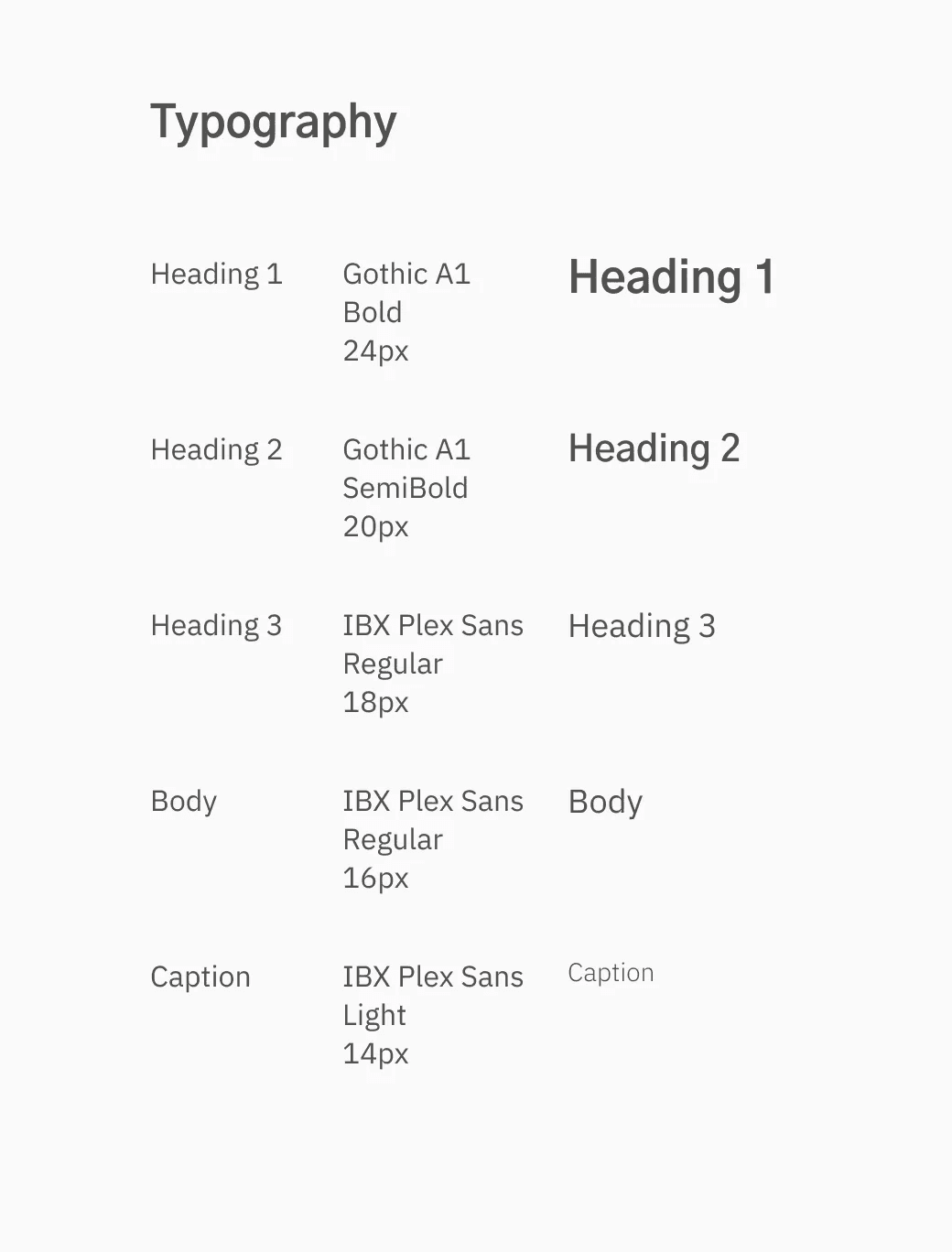
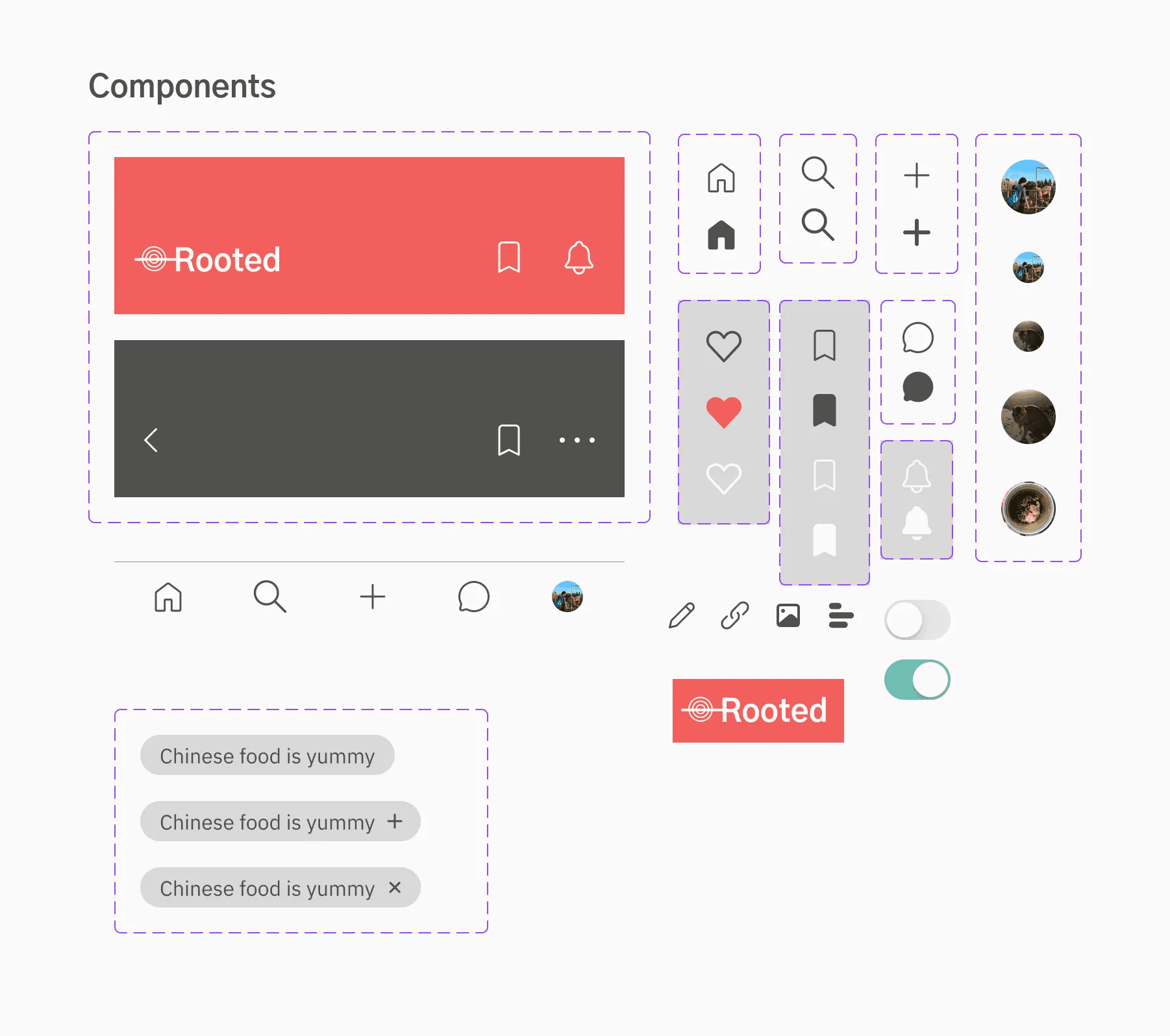
For my design system, I chose simple yet bright colors that hold positive connotations in AAPI cultures and are also familiar to users who read digital materials. While red, often considered lucky, is present throughout the app, I chose a dark gray as the header color for news articles to distinguish the difference in source and provide a more serious image to complement possible article contents. The typography styles I selected are both modern and neutral in emotion, suitable for unbiased body texts. Gothic A1 is also sourced from Asian designers and IBX Plex Sans was chosen for its versatility of supported languages, useful for a multicultural platform.
Onboarding

Onboarding allows users to customize their app experience before they begin exploring, helping them find topics more relevant to their interests from the get-go. It also offers a brief preview and tutorial of how a user might use the app, with a short video for visual demonstration. However, to ensure the safety and integrity of the user base, new users must verify their accounts before accessing the app.
Annotating Articles

Annotating articles and posts is a feature unique to Rooted, allowing users to customize how they wish to interact with textual material. It offers users more opportunities to share their experiences, if, for instance, there is a specific piece of text that resonates with them. Annotations would also provide an easier experience when users want to ask or answer multiple questions, fostering the growth of a supportive online community.
Creating a Post

Users can share their experiences, questions, and other knowledge by making a post. Several tags can be selected to help their post reach people who may be interested in it, though they are optional. Users can add up to three tags; they are not restricted from adding tags once the limit is reached, but they will not be able to post until the number of tags is back under the limit. There are also suggestions for tags based on the content of your post, in case users are not sure what categories their post falls under.
Takeaway
Challenges
Time limitations were the biggest challenge I faced throughout this project. I had trouble finding and scheduling times for more user research and I also had difficulties ideating possible solutions for the scope of the problem that my app addresses.
Next Steps
In the future, I would like to design more features of the app, such as the explore and profile functions. I would also like to design a dark mode setting and possibly a desktop website for the various reading needs of users.
Previous Project: